
How to Make a Free Official Homeschool Transcript
I earn a commission from products purchased through links in this post.
If you homeschool high school, you are responsible for providing your student with an official homeschool transcript. Don’t worry. It sounds more intimidating than it really is.
A high school transcript is simply a record of a student’s high school coursework and achievements. The focus is on the classes taken and the grades received.
A homeschool transcript is official just by being created by the homeschool administrator (aka homeschool parents). If you are running a legal homeschool, your transcript is official.
The homeschool transcript is used in a few situations:
- College applications (including dual enrollment)
- To transition back to public school (at the principal’s discretion)
- To earn a good student discount on car insurance
- To show proof of completing high school
- Admission to trade schools
As the chief administrator of your homeschool, it is your responsibility to create a transcript for each high school student. I recommend creating one as soon as your student begins doing high school-level work. This makes it easy to update each semester, so your student always has a current transcript prepared.

How to Make a Free Official Homeschool Transcript
It is really easy to make a homeschool transcript in Google Docs. I have made two transcripts for my homeschoolers with this method. Their transcripts were accepted by colleges with no difficulties. It doesn’t take very long, it is easy to update, and it is free.
Don’t worry about a transcript being beautiful. Its main purpose is to quickly provide readers with information. It isn’t put on display and doesn’t need to be lovely. A high school diploma is beautiful, not a transcript.
It just needs to be well-organized and easy to read.
I used these exact steps to create my daughter’s transcript. It was accepted at our local community college for dual enrollment with no problems.
- Begin by making a new Google Doc.

2. Center the first line and type the name of your homeschool. On the next line, type “Official High School Transcript”.
3. Insert a table with two columns and one row.
4. The first column will contain student information. Organize it like this:
- Full student name
- Date of birth
- Address
- Phone number
5. The second column will contain the homeschool information. List it in this order:
- Name of your homeschool
- School address (It is okay if it matches your student’s address)
- The phone number for school (your home or cell)
- Name of chief administrator
6. Underneath the table, write the date of high school entry.
7. On the next line, write the estimated date of high school graduation.
Just the month and year are fine. Once your student has completed high school, you will update this line to reflect the actual date.

8. Insert another table with two columns and one row.
This is where you will list all of your student’s course titles, credit hours, and grades. There are two ways to list the courses:
- Chronologically by high school years (9th grade, 10th grade, 11th grade, 12th grade)
- By subject (language arts, math, science, history, foreign language, and electives)
Chronologically is standard, but as long as a specific format isn’t requested, you can do it however you want. I chose chronologically because it seems the most organized to list the courses by grade level, and that is how my brain works.
9. Begin entering schoolwork, credits, and grades into the table.
I like to have 9th and 10th grade on the left side of the table and 11th and 12th grade on the right side.
List the course title, the final letter grade, and the number of credits for the course on one line.
If a class is a college course, mark it with an asterisk. Make a note on the bottom that the asterisk means it was completed at community college (or wherever it was completed).
Note that you might need to play with the text size to get everything to fit on one page.
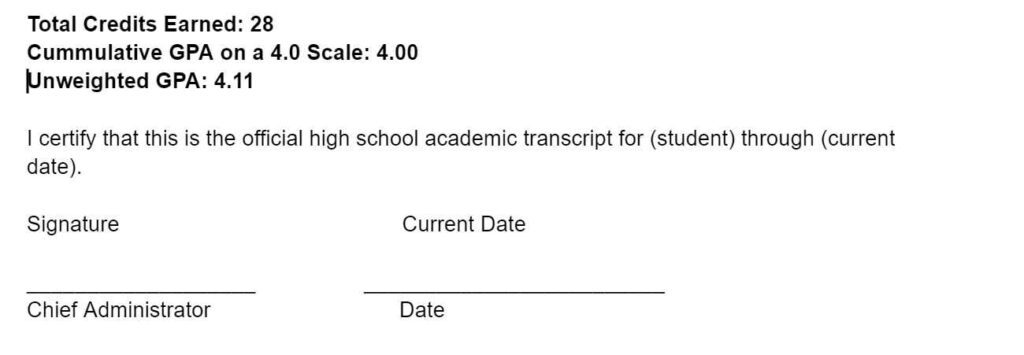
10. Under the table, state the total number of credits earned.
11. Next, state the cumulative GPA (grade point average) on a 4.0 scale
High school classes are generally calculated on the following grading scale:
- A = 4.0
- B = 3.0
- C = 2.0
- D = 1.0
- F = 0.0
Dual enrollment, AP, and Honors classes are generally calculated on the following grading scale:
- A = 5.0
- B = 4.0
- C = 3.0
- D = 2.0
- F = 0.0
This grade point calculator can help you calculate your student’s GPA. Some people find GPA calculations a little tricky, so this free calculator can help.
12. Next, write a short statement saying that this is your student’s official homeschool transcript.
“I certify that this is the official high school academic transcript for (student full name) through (current date or date of high school graduation).”
13. Sign the transcript with your name typed below. I have always just ‘signed’ it with a script font. Be sure to include the date.

That’s it! Your homeschool transcript is now complete! Be sure to update it every semester, or anytime there are changes.
Frequently Asked Questions About Homeschool Transcripts

Is a homeschool transcript valid?
Yes, a homeschool transcript is just as valid as transcripts from a traditional school. It is a homeschool student’s official record of high school courses and grades. If a student was homeschooled in accordance with their state homeschool laws, their transcript should be accepted.
Can I include high school courses taken in middle school?
If your student began taking high school courses in middle school, feel free to include them on the transcript. Personally, I listed any core subjects, such as Algebra or Physics, taken in middle school, but did not include high school-level electives taken in middle school.
What needs to be on a homeschool transcript?
A homeschool transcript should contain:
- School name
- Student’s full legal name and date of birth
- School address
- Student’s address (Yes, this is usually the same as the school address.)
- Each course name and when they were taken
- Final grade for every class
- Weight of grades (Dual enrollment classes are typically weighted.)
- Number of credits earned for each course
- Total number of high school credits earned
- Cumulative G.P.A.
- SAT, ACT, or AP test scores (There is debate about this. I chose to leave these off. The official test scores will be sent separately.)
- Any academic honors earned
- Date of high school entry
- Date of high school graduation (an estimated month and year is fine until your student actually graduates)
- Dated signature of the homeschool chief administrator
- Social security number (This is optional, but some DMVs will allow a transcript to act as a form of identification if it contains the social security number. I personally leave it off as my teens have alternate forms of identification.)
I compiled that list by comparing the requirements suggested by my state (NC) Department of Nonpublic Education, the College Board, and the community college my daughter attended.
Should I list extracurricular activities on a transcript?
No. Extracurricular activities can be listed on college applications and mentioned in essays or references, but they do not belong on a transcript.
Who should have a homeschool transcript?
Every high school homeschooled student should have a transcript, regardless of their future plans. It is the official record of their work. Plans can change years down the road. Do you want to try to remember what classes your student took or their grades when they are 35? A high school transcript should always be available for everyone.
Maintaining a current transcript all the way through high school is part of being a homeschool parent. It is not optional.
Should I list the curriculum used?
No, this does not belong on a transcript. Instead, create a separate document for course descriptions. That document will contain the titles, objectives, curriculum, and grading criteria for each course.
Who will see my homeschool transcript?
College admissions officers, prospective employers, and, of course, anyone you show the transcript to may see your homeschool high school transcript.
Can I create my own transcript?
A parent or the homeschool chief administrator should create or purchase a transcript for their students. The students should not need to create their own transcripts.
How long should I keep a transcript?
The homeschool chief administrator should plan to keep each student’s transcripts permanently. There may be a time in the future when these are needed.
I recommend keeping updated transcripts digitally while a student is in high school. Share the password with whoever would be responsible for continuing your child’s education in the event you were unable to continue. I shared the Google doc with my husband.
After graduation, print and sign multiple copies and keep them in a lockbox so they are secure. You may want to notarize one copy, but we haven’t had a need for a notarized copy yet. I also gave my graduates access to view the Google doc. They do not have editing permissions, so they can’t change anything, but they can download or print a copy at any time.
The digital copies are easy to access, but a printed copy ensures that we can recreate the file if there is ever a problem digitally.
Public school students are able to request a copy of their transcript at any time, and our homeschool kids should have that same opportunity.
How do I know when my student has met graduation requirements?
In most states, parents set the graduation requirements for their homeschool. I based my graduation requirements on our state college admission requirements.
Related: Create a High School Plan
What is dual enrollment?
Dual enrollment is when a student earns college credit and high school credit at the same time. For example, my daughter took a United States history class at our local community college when she was in 11th grade. That class earned her high school credit and college credit.
Related: 5 Things You Should Know About Dual Enrollment
What are some common homeschool transcript mistakes?
It seems like some of the most common homeschool transcript mistakes include:
- Forgetting to sign the transcript
- Forgetting courses taken before starting the transcript (This is why I recommend starting as soon as your student begins taking high school-level courses.)
- Forgetting to update the transcript after graduation
- Including too much information (Extracurricular activities and volunteer hours do not belong on the transcript.)
- Padding the transcript with courses that don’t really belong in order to boost the GPA, ex – driver’s ed (A good rule of thumb is that if it isn’t included on a public school transcript, don’t include it on your homeschool transcript.)
- Not issuing a transcript at all
Are there transcript services?
Yes, you can pay for a company to create a transcript for you if you do not want to make one yourself. Please know that you do not have to pay for a service in order to have an official transcript. I can’t recommend any transcript services because I didn’t use one. I used the above procedure to create a free homeschool transcript.
I hope this post helped you feel empowered to create an official high school transcript for your homeschooler.
Keep reading . . .
- 8 Things to Know About Homeschool Diplomas
- How to Create a High School Plan
- Important Things to Know Before College
- 5 Things to Know About Dual Enrollment
- 5 Ways to Earn High School Lab Credit
- Important Types of Books to Read in High School
- 7 Important Things to Know Before Homeschooling High School
- Homeschooling High School Resources, Curriculum, and Tips
As an Amazon Associate I earn from qualifying purchases.