
Syllabird – An Awesome Online Homeschool Planner
I earn a commission from products purchased through links in this post.
Keeping paperwork organized is important when you are homeschooling. There are lessons to plan, grades to track, and calendars to update. Thankfully Syllabird, an online homeschool planner, makes it easy!
You do not need paper planners to be organized. You just need a well-thought-out online homeschool planner and a few minutes to set it up.
Taking a little bit of time at the beginning of the school year to set up this Syllabird system can keep you on track through the whole year. After it is set up you will only need a few minutes each week to input grades. That is it!
I truly believe that staying organized is the key to having a successful homeschool year.
Syllabird – An Awesome Online Homeschool Planner

This is a post sponsored by Syllabird. I was compensated for my time, but all opinions are my own.
The main features of Syllabird are a digital homeschool planner, a homeschool grade tracker, and a homeschool calendar.
Digital Homeschool Planner
Syllabird is a great online homeschool planner. The website is easy to use and makes organizing your homeschool year simple.
The Syllabird online homeschool planner manages the assignments for all of your students and all of the homeschool courses. There are different options so you can create the planner that works best for your family’s unique needs. Set the schedule at the beginning of the year and it is ready for the entire year.
Homeschool Grade Tracker
Keeping track of grades is a necessary part of homeschooling high school. We need grades in order to create transcripts or report cards. All high school students deserve high school transcripts, even if they don’t have plans to attend college. Plans change and students deserve a record of their work.
Syllabird makes keeping track of grades simple, even if you choose to weigh certain types of assignments. For example, some homeschool parents choose to give tests more weight than quizzes in the grade book.
Homeschool Calendar
I’m someone who needs access to an updated calendar all of the time, and I know I’m not alone. Syllabird maintains the calendar so you don’t have to. It allows you to easily see your weekly planner with your full homeschool schedule.
The calendar is conveniently accessible online, but it is also easy to print. Just export as a PDF and print. Printing is a great option if your state law requires portfolio reviews or lesson plans.
How Does Syllabird Work
Plan Homeschool Courses
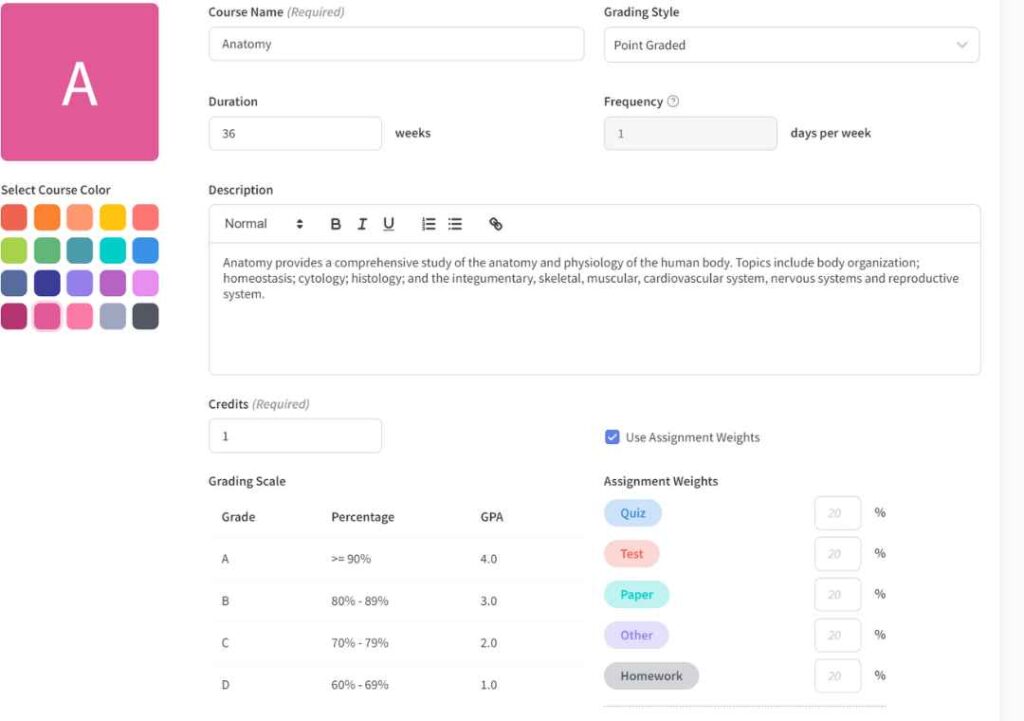
It is easy to add homeschool courses to Syllabird. You can choose the duration and the frequency of the course as well as your preferred grading style.
After the course is set up, the next step is to add the assignments. You can select when the assignment will be assigned, the due date, the type of assignment, and whether the work will be graded.
You can set up individual assignments, but it is also possible to create repeating assignments.
Individual assignments are assignments that change each week. For example, each week my daughter’s anatomy homeschool curriculum looks different. She reads from a variety of books and does a variety of labs. I set up each of her assignments individually.
Repeating assignments are assignments that are the same every week. This might be something like reading 30 minutes a day or doing the next math page in the workbook. You can also create an ungraded course for repeating extracurricular activities so those are on your student’s calendar too.
I really like that you can upload PDF files, assignment sheets, documents, or presentations to the assignment. You can even link websites in the description. This keeps the assignments organized for the parent and the student.
Doing all of the homeschool lesson planning at one time is a huge time saver! After the lessons are planned in Syllabird, you won’t need to spend your weekends lesson planning.
If you have friends who use Syllabird, you can share courses, saving even more time! The course is also automatically saved for as long as you have a Syllabird account. This lets you use the course again with other students.
Set Up Student Accounts

To add a student the first thing you need to do is add their student name and the current grade level. Then you can add them to courses.
Then you can create a student account with an email address and a password.
When a student logs in they can see all of their school work that is assigned that week. They can also filter it by course. It is easy to quickly view different weeks, in case they want to work ahead. Students also have the option of exporting and printing, if they prefer working with printable schedules.
Students can also see their grades for each assignment.
Use the Calendar
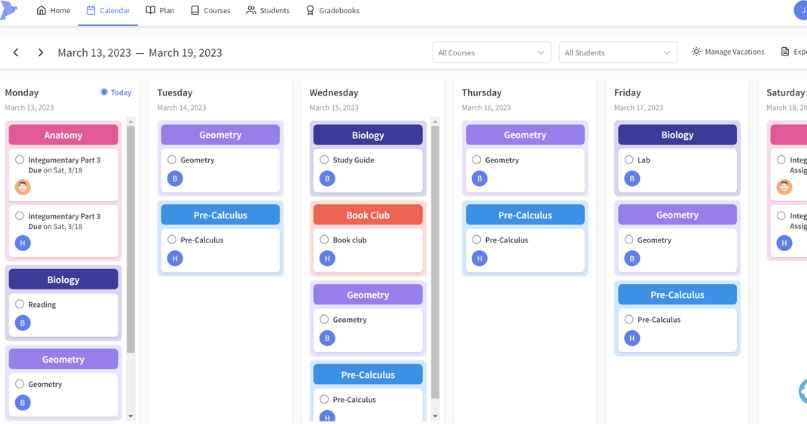
The calendar allows you to see your weekly schedule at a glance. You can change the week you are viewing with a quick click. It is also easy to filter by the course or the student.
Grade Assignments
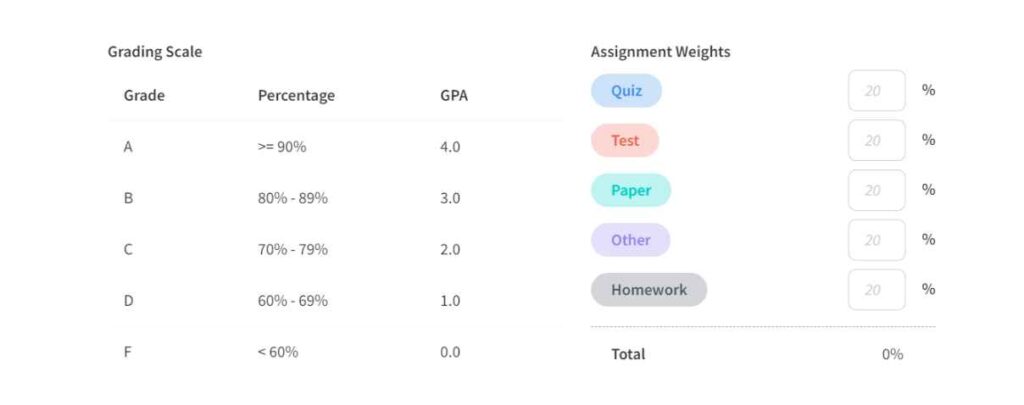
When you set up a course you can set up grading in a few different ways.
- Not graded
- Percent graded
- Points graded
You can also decide whether you want to weigh different types of assignments. There are five assignment types:
- Quiz
- Test
- Paper
- Other
- Homework
Assignments can all be worth the same value or each type of assignment can be weighted differently. You can decide how much weight each assignment carries, as long as the total equals 100%.
After you determine the grade for an assignment, it is easy to enter it into the Syllabird grade book. Just click on the assignment and enter the percentage grade and hit save.
The grading book uses a 10-point grading scale. This is what I personally use too. My daughter’s community college courses use a 10-point grading scale, so this seems to be a pretty common grading scale.
Syllabird automatically adds it to the student’s grade book. When you open a student’s grade book for each you can see all of the assignments and their grades at a glance.
Syllabird Has Thought of Everything!

Going on Vacation?
This online homeschool planner makes it easy to plan around vacations. Just go to the calendar page and hit the manage vacations button. You can set your vacation dates and Syllabird will not schedule anything during that time frame.
Need to Reschedule an Assignment?
We can plan everything perfectly, but sometimes life still gets in the way and we need to reschedule assignments. In my home, this usually happens when someone is sick, a doctor’s appointment runs too long, we go on field trips, or grandparents make a surprise visit.
Syllabird lets us reschedule assignments with a few quick clicks of the keys. Open the assignment you want to reschedule, click reschedule, and then select the new due date. You can keep the rest of the assignments the same (what I usually do) or shift to the next assignment in the course.
Need to See the Homeschool Tracker On the Go?
It is easy to reference or update your Syllabird homeschool tracker even when you are not sitting in front of your computer. The website is mobile-friendly, so it is easy to use from your mobile device. This is a huge advantage of a digital planner.
Want to Try Syllabird?
Syllabird is offering homeschool parents the opportunity to try Syllabird for free! You can sign up for a two-week free trial, no credit card is required. There is zero risk in trying this online planner.

Syllabird might be for you if:
- You don’t want to spend your weekends homeschool planning. Syllabird can help you save valuable time!
- You need access to your homeschool calendar, lesson planner, and grade book when you are away from home
- You find it hard to keep up with a paper planner
- You are overwhelmed trying to figure out how to weigh grades
- You want to give your middle schoolers or high schoolers a bit of independence and responsibility
- Your students want access to the lesson plans so they can make their to-do lists
- Busy moms and dads both want access to the homeschool calendar (just share the login information)
- You want the ultimate homeschool planner
I really like that Syllabird does the heavy lifting of managing a homeschool planner. My husband does some of the homeschooling in my house and it is nice that he can see the homeschool calendar and grade book without needing to take a binder from my desk. The digital format is laid out well and works intuitively.
While this planner works for any grade level, I think it is most beneficial for homeschool parents with middle school or high school students. This is the point when they are ready to start taking on a bit more responsibility. They can log in and see their assignments without much parental help.
Syllabird is an awesome online homeschool planner! It is a great way to organize your homeschool. I definitely recommend giving it a try.